
How to Set Up Apache Tika with Open WebUI in 2026
 Jonas Scholz
If you've tried using OpenWebUI's default document parsing — like uploading a PDF and asking questions — you probably noticed it's not great out of the box. Let's fix that with Apache Tika.
The problem? OpenWebUI by default doesn't use specialized tools for extracting text from complex documents. So if your input is a scanned PDF, a DOC file, or even just a weirdly formatted PDF, it will likely fail or produce garbage output.
Quick Answer
Run Apache Tika as a separate container next to Open WebUI, then point Open WebUI's document extraction setting at http://tika:9998/tika. If you host Open WebUI on a Docker platform like Sliplane, deploy Tika as another service in the same project and use the internal service URL instead of exposing Tika publicly.
| Component | What it does | Hosting note |
|---|---|---|
| Open WebUI | Chat UI and document upload flow | Needs persistent app data |
| Apache Tika | Extracts text and metadata from files | Keep it internal to the app network |
| LLM provider/model | Answers questions over extracted content | Can be local, hosted, or API-based |
Here is a 1 minute tutorial on how to set up Apache Tika with OpenWebUI:
Why Use Apache Tika?
Apache Tika is a mature open-source project by the Apache Foundation. It's been around for over 18 years and handles hundreds of document formats, including:
- DOC/DOCX
- PPT/PPTX
- XLS/XLSX
- EPUB
- HTML
- Plaintext
- Legacy formats like DOC (97-2003)
- Many more
Tika extracts text and metadata reliably, making it a much better backend for document parsing in OpenWebUI.
How to Set Up Apache Tika with OpenWebUI
Docker Compose Setup
Here's a simple compose.yml file that runs both OpenWebUI and Apache Tika:
services:
  openwebui:
    image: ghcr.io/open-webui/open-webui:main
    ports:
      - "3000:8080"
    volumes:
      - openwebui:/app/backend/data

  tika:
    image: apache/tika:latest
    ports:
      - "9998:9998"

volumes:
  openwebui:
Configure OpenWebUI
- Start both services with
docker compose up -d - Open OpenWebUI at
http://localhost:3000 - Go to Admin Panel → Settings → Documents
- Set the Content Extraction Engine to Tika and then the URL to:
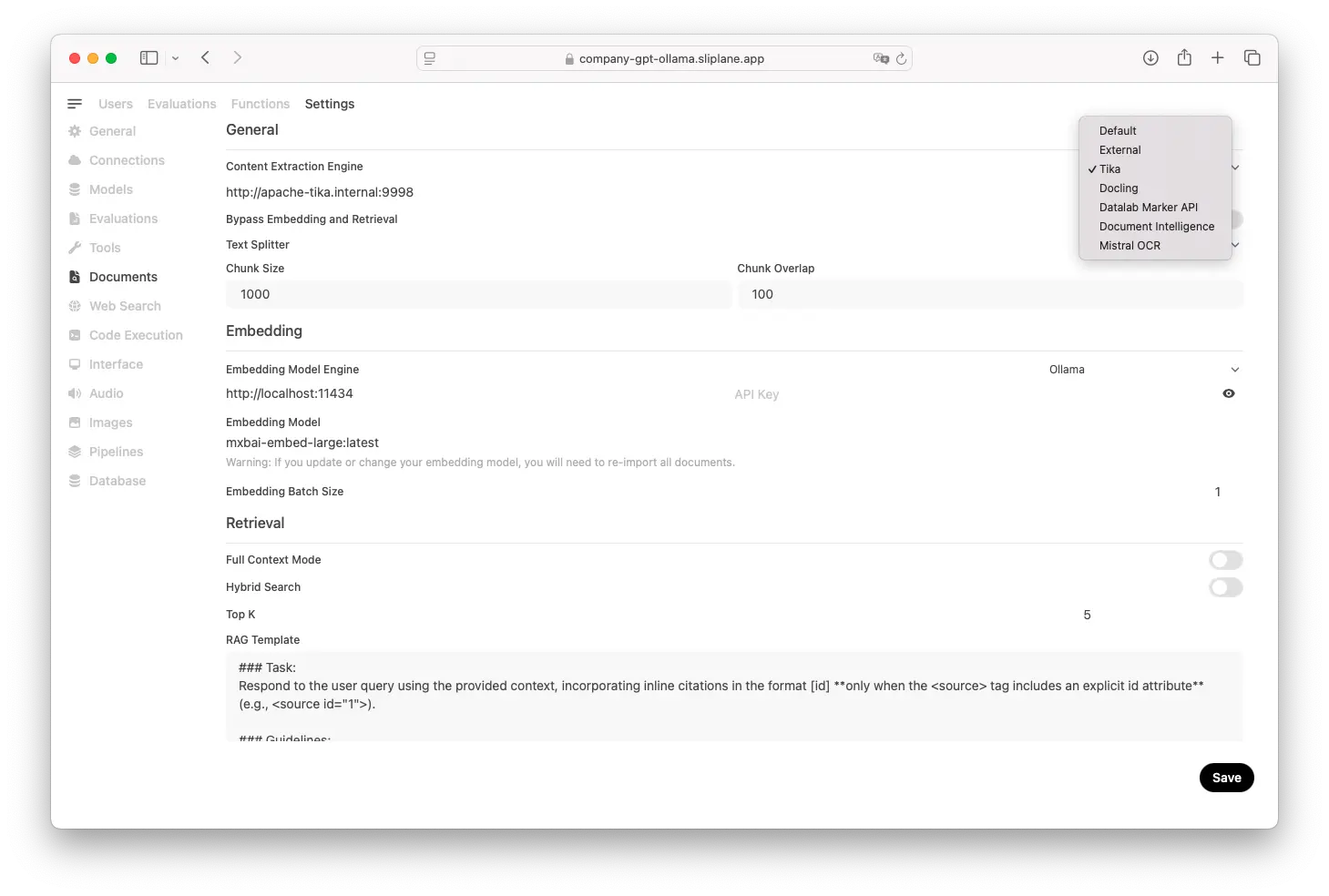
http://tika:9998/tika
- Save the settings
- Validate the setup by uploading a document and checking the Tika logs.
You should see something like:
INFO [qtp1393198164-60] 15:03:46,042 org.apache.tika.server.core.resource.TikaResource /tika (application/pdf)
Example: Parsing a PDF
Upload a PDF in OpenWebUI, ask questions about its content, and compare the results before and after setting up Tika. You'll notice:
- Better text extraction
- Support for more formats
- Fewer parsing errors
Try uploading complex documents like:
- Scanned PDFs
- Multi-column layouts
- Documents with tables
- Legacy Microsoft Office files
Troubleshooting
If documents aren't parsing correctly:
| Symptom | Likely cause | Fix |
|---|---|---|
| Open WebUI cannot reach Tika | Wrong hostname or Tika is not on the same Docker network | Use http://tika:9998/tika in Compose, or the internal service URL on your hosting platform |
| PDFs parse as empty text | Scanned image PDF | Run OCR before upload or add an OCR pipeline |
| Large documents time out | File is too big or Tika needs more memory | Increase memory, split files, or process documents asynchronously |
| Tika works locally but not in production | Tika port is not reachable from Open WebUI | Keep both services in the same private network and avoid public exposure |
- Check Tika is running:
docker ps | grep tika - Test Tika directly:
curl -X PUT --data-binary @your-document.pdf http://localhost:9998/tika --header "Content-type: application/pdf" - Check OpenWebUI logs:
docker logs <openwebui-container-id>
FAQ
Is there an alternative to Apache Tika? Yes, but most alternatives are either commercial or more limited. Tika is free, open source, and extremely battle-tested.
Does this cost anything? No. Both OpenWebUI and Apache Tika are open source and free to use.
Does it scale? For most use cases, a single Tika container is fine. If you need to scale, you can run multiple Tika containers behind a load balancer.
What about security? Tika processes documents server-side, so ensure your setup is properly secured if handling sensitive documents. Consider running it in an isolated environment.
Video Demo
Here's a 40-second demo video showing:
- How to deploy Apache Tika on Sliplane
- How to configure it in OpenWebUI
- How to test it with a real PDF
Conclusion
Setting up Apache Tika with OpenWebUI transforms document parsing from frustrating to functional. With just a few configuration steps, you can handle hundreds of document formats reliably.
If you have any questions, feel free to reach out in our Support chat (bottom right).
Cheers, Jonas